

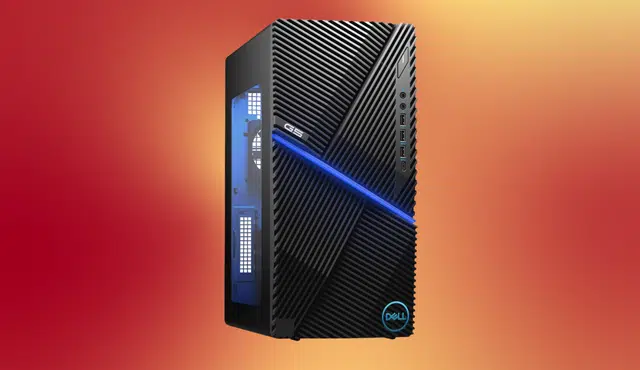
Buying a prebuilt gaming desktop from Dell removes the complexity of sourcing and assembling individual components — but not all prebuilts are equal. Dell’s gaming lineup spans two distinct tiers in 2026: the premium Alienware line for enthusiasts who want flagship performance with strong warranty support, and the G-series for gamers who want solid 1080p or 1440p performance without the premium price tag. This guide breaks down each option so you can choose the right system for your budget and how you actually play.
Understanding Dell's Two Gaming Desktop Lines
Dell’s gaming portfolio spans two tiers: Alienware, the premium flagship line for enthusiasts with larger budgets, and the G-series, a value-oriented option for gamers seeking performance without premium aesthetics.
The practical difference: Alienware desktops prioritize thermal management, modular design, long-term upgradability, and premium support options. G-series desktops prioritize honest gaming performance at more accessible price points. Both are legitimate choices — the right one depends on your budget and how much you value those extras.
Alienware Area-51: The Flagship
The Alienware Area-51 is Dell’s best gaming desktop right now, winning out through cutting-edge spec options blended with conventional design elements that make it easier to upgrade.
The Area-51 pairs a K-series Core Ultra CPU with RTX 5070 graphics and liquid cooling. Key specs include an Intel Core Ultra 7 265K with 20 cores running up to 5.5 GHz, NVIDIA GeForce RTX 5070 with 12GB GDDR7, 16GB DDR5 RAM, 1TB PCIe Gen5 NVMe SSD, an 850W Gold PSU, and a 240mm liquid CPU cooler with a tempered glass door.
The Area-51 is extremely spacious internally, so you will never need to worry about fitting larger GPUs and coolers in the future. For buyers who want a desktop that can be meaningfully upgraded over a four to five year period, this is the strongest option Dell offers.
The trade-off is price. If you are aiming for mid-range specs, the Aurora R16 is a better starting point than the Area-51 due to its lower entry price.
Best for: Serious enthusiasts, streamers, and buyers who want the most powerful and upgradable Dell desktop available.
Alienware Aurora R16: Best Balanced High-End Option
The Aurora R16 still reigns supreme as the best Alienware PC for most players, available with premium GPUs like the RTX 5080 or more affordable RTX 5070 and 5060 options depending on budget.
The Aurora R16 at $1,999 pairs a Ryzen 9 9900X with an RTX 4080 Super, delivering 1440p gaming at 120-plus FPS while maintaining dual-purpose capability for gaming and light streaming. The Aurora R16’s thermoelectric cooling system keeps the RTX 4080 Super at 69°C sustained — exceptional for this GPU class — with CPU thermals of 64°C on the included 280mm AIO cooler.
The Aurora R16 uses a tool-less panel design with fans and filters accessible without a screwdriver, modular SSD bays supporting up to four drives, and a clean cable management harness. 2 cores allow streaming while gaming using x264 medium preset without FPS loss — something 8-core systems typically struggle with.
Alienware’s warranty on the Aurora R16 covers three years with parts replacement included — valuable for buyers who prefer not to manage their own repairs on a $2,000-plus system.
Best for: High-end gamers who want flagship thermal management and warranty support without the Area-51’s price premium.
Dell G-Series: Best Value Gaming Desktops
For buyers who want honest gaming performance without paying for Alienware branding and aesthetics, the Dell G-series delivers.
The Dell G16 5630 at $1,299 hits the sweet spot for 1440p gaming, pairing a Ryzen 7 7700 with an RTX 4070 Super and delivering 1440p gaming at 100-plus FPS in competitive titles and 80-plus FPS in demanding AAA games. The RTX 4070 Super’s thermal management keeps sustained temperatures at 71°C — excellent for a prebuilt at this price point.
The Dell G15 5530 at $899 proves that Dell’s budget G-series can deliver honest gaming performance for buyers entering PC gaming or upgrading from a console. At 1080p, entry G-series systems handle current titles comfortably.
Best for: Budget-conscious buyers, first-time PC gamers, and anyone who wants solid 1080p or 1440p performance without the Alienware premium.
Dell Gaming Desktop Comparison: 2026
| Model | Starting Price | CPU | GPU | Best For |
|---|---|---|---|---|
| Alienware Area-51 | ~$2,899 | Intel Core Ultra 7 265K | RTX 5070 | Flagship power and upgradability |
| Alienware Aurora R16 | ~$1,999 | AMD Ryzen 9 9900X | RTX 4080 Super | Balanced high-end gaming |
| Dell G16 5630 | ~$1,299 | AMD Ryzen 7 7700 | RTX 4070 Super | Best value 1440p |
| Dell G15 5530 | ~$899 | Intel Core i7 | RTX 4060 | Budget entry-level gaming |
What to Know Before Buying Any Dell Gaming Desktop
Bloatware comes pre-installed. Dell ships gaming desktops with Alienware Command Center, Dell SupportAssist, and Windows Copilot pre-installed. Budget approximately 30 minutes after setup to remove unwanted software.
RAM is often the first upgrade. Entry configurations on both the Aurora and G-series frequently ship with 16GB of RAM. For gaming in 2026, 32GB is the more comfortable baseline — particularly if you run multiple applications alongside your games.
Storage fills up quickly. A 1TB SSD is adequate to start but will fill up within a year for active gamers. Both the Alienware Area-51 and Aurora R16 support multiple additional drives, making expansion straightforward.
Cooling matters more in a prebuilt. Unlike a custom build where you choose every component, prebuilt thermals depend entirely on what Dell includes. Alienware’s liquid cooling configurations justify their price premium for users who plan to game at high settings for extended sessions.
Upgrading Your Setup? Sell Your Current PC First
If you are upgrading from an older desktop, gaming laptop, or previous-generation console, selling your current device before purchasing a new system is one of the most effective ways to reduce out-of-pocket cost. Gizmogo accepts laptops and electronics in any condition and provides an instant quote with free prepaid shipping and payment within 24 hours of delivery.
Frequently Asked Questions
Which Dell gaming desktop is best in 2026?
The Alienware Aurora R16 is the best Alienware gaming desktop for most players in 2026, offering a strong balance of performance, thermal management, and warranty support at a lower price point than the flagship Area-51.
What is the difference between Alienware and Dell G-series gaming desktops?
Alienware is Dell’s premium gaming line, prioritizing flagship components, advanced thermal management, and long-term support. The G-series is value-oriented, targeting solid gaming performance at more accessible price points without premium aesthetics.
Is a prebuilt Dell gaming desktop worth buying versus building your own?
Prebuilts from Dell offer the convenience of a complete, tested system with warranty coverage. Custom builds can deliver more performance per dollar but require component sourcing, assembly knowledge, and carry no unified warranty. For buyers who want a ready-to-use system without managing repairs, a prebuilt is a reasonable trade-off.
How much RAM do I need in a gaming desktop in 2026?
32GB of DDR5 RAM is the recommended baseline for gaming in 2026, particularly if you multitask or stream while gaming. Many entry Dell configurations ship with 16GB, which is functional but may feel limiting within one to two years.
Where can I sell my old gaming PC or laptop before upgrading?
Gizmogo offers instant quotes, free prepaid shipping, and payment within 24 hours for electronics in any condition.
Ready to upgrade your gaming setup? Sell your current device at Gizmogo — instant quote, free shipping, fast payment.