

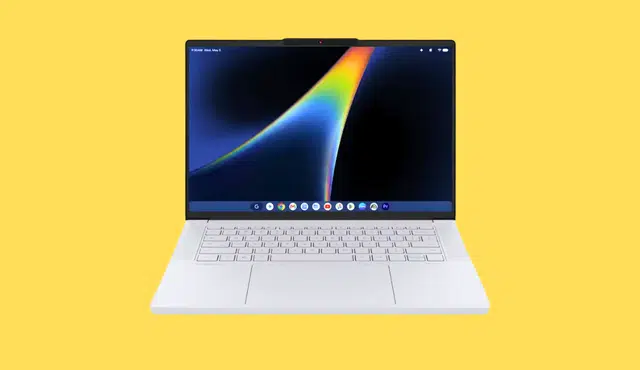
Acer’s reported Googlebook points to a different kind of Chromebook: a laptop built around premium hardware rather than a low entry price. If Acer pairs its rumored Core Ultra performance, ample memory, and OLED display with capable desktop-style software, the Googlebook could address the compromises that limit many premium Chromebooks.
You may get a Chromebook successor that feels suitable for demanding work instead of basic browser tasks, but the software will decide whether the hardware matters. Reports of the Acer Googlebook 14’s leaked premium specifications suggest a platform with higher expectations—and a need to meet them.
A Premium Hardware Foundation
Acer’s reported Googlebook 14 specifications target workloads beyond web browsing and school assignments. Your buying decision will depend on whether its software experience and final price justify hardware that resembles a premium Windows laptop.
Leaked Acer Googlebook 14 Configurations
Retailer listings and benchmark references point to two possible Acer Googlebook 14 configurations. The higher-end model reportedly pairs an Intel Core Ultra 7 355 with 32GB RAM, while a second configuration listed through GbookHub benchmark information uses a Core Ultra 5 325, 16GB RAM, and a 256GB SSD.
Reported configuration | Processor | Memory | Storage |
Higher-end Acer model | Core Ultra 7 355 | 32GB RAM | Not specified |
Alternate listed model | Core Ultra 5 325 | 16GB RAM | 256GB SSD |
These remain unconfirmed pre-release details, so you should not treat them as final specifications. Still, they indicate Acer may position its first Googlebook laptop platform above the low-cost systems that defined much of the Chromebook market.
Why the Display, Memory, and Storage Matter
A reported 14-inch 2.8K 120Hz OLED display would give you sharper text, deeper contrast, and smoother scrolling than the standard 1080p LCD panels common in budget laptops. The 120Hz OLED panel also matters for animation, video playback, and touch-like interface interactions, although it could reduce battery life at its highest refresh setting.
32GB RAM would leave substantial room for many browser tabs, Android applications, video calls, and Gemini-based features running at the same time. Even 16GB RAM represents a practical baseline for a premium laptop in 2026.
The 256GB SSD in the lower-spec listing is less generous. If you keep large photo libraries, downloaded media, or offline files, you may need cloud storage or a model with more local capacity.
The Value Test Against Windows and MacBooks
Premium components alone will not make the Acer Googlebook 14 a better purchase than a Windows laptop or a MacBook. You need a platform that handles desktop multitasking, external displays, file management, and Android apps without imposing compromises that conventional laptops avoid.
A high-resolution OLED screen, Intel Core Ultra processor, and ample memory can support a premium price, but only within limits. At similar prices, Windows systems offer broad legacy software support, while MacBooks provide established performance, battery-life, and application ecosystems.
Acer and Google therefore need to show that the Googlebook laptop platform gives you useful advantages, such as reliable Android app integration and well-implemented Gemini tools, rather than simply placing premium hardware around a browser-first experience.
Software That Must Deliver Desktop-Grade Workflows
Premium hardware will matter only if you can use it for real work without running into mobile-app limits or browser-only compromises. Reports describe an Android-and-ChromeOS direction with Gemini, phone continuity, and new interface tools, but Google must define the finished experience clearly.
Android and ChromeOS on a Unified Platform
Reports portray Googlebook as a platform that combines Android with ChromeOS rather than simply renaming a Chromebook. That could give you Android apps from Google Play alongside the Chrome browser, web applications, and ChromeOS-style file management and windowing.
The key test is whether those parts behave like one system. You should be able to open Android apps in resizable windows, move files between them and browser tabs, use keyboard shortcuts consistently, and receive reliable notifications without treating the laptop like a large tablet.
Some coverage calls the platform Aluminium OS, but Google has not established that name through widely verifiable public documentation. Until Google details its desktop workflows, support lifetime, and compatibility rules, treat platform names and feature lists as provisional.
Gemini Features and Magic Pointer
Google has positioned Gemini and Google DeepMind’s AI work as central to Android’s future, but useful AI assistance must remain optional and predictable. On a laptop, you should expect Gemini to help with writing, search, organization, and task context without taking control of files, messages, or applications without clear approval.
Reports about a Gemini-first Googlebook and “Magic Pointer” controls need official confirmation. If Magic Pointer becomes a real feature, it should improve precision across touch, trackpad, and Android interfaces rather than add another gesture system to learn.
A rumored Glowbar could show charging, notifications, or Gemini activity. Google should let you disable it, control its brightness, and prevent it from exposing sensitive information in public.
Phone Integration, Widgets, and Daily Productivity
Android phone-app casting could be more useful than basic notification mirroring. Features described as Cast My Apps would let you use a phone-only service on the laptop screen, which may help with messaging, authentication, or apps such as Duolingo that do not offer full desktop versions.
That convenience depends on practical limits. You need to know whether casting requires the same Wi-Fi network, how it handles calls and locked phones, what data remains on your Android phone, and whether it works with non-Pixel devices.
Google could also use desktop widgets to create a personalized dashboard. A Create Your Widget tool, Gmail previews, calendar items, and Quick Access shortcuts could save time, but only if you can choose what appears and stop sensitive content from showing on the lock screen.
Launch Timing, Partners, and Remaining Questions
Several reports place the first Googlebook systems in fall 2026, with Acer, ASUS, Dell, HP, and Lenovo named as potential partners. Google has not provided enough independently verifiable detail to treat every claimed launch feature, specification, or partner commitment as final.
The reported Acer Googlebook 14 configuration includes a Core Ultra processor, up to 32GB of memory, and a 2.8K OLED display. That hardware would support demanding multitasking, but the platform also needs efficient options for Snapdragon-based systems.
Before you buy, look for confirmed answers on pricing, desktop-app support, Android-app window behavior, automatic security updates, offline use, enterprise management, and how Gemini Intelligence handles personal data. Google may discuss these details around Google I/O 2026 or The Android Show: I/O Edition, but published product documentation should settle them.