

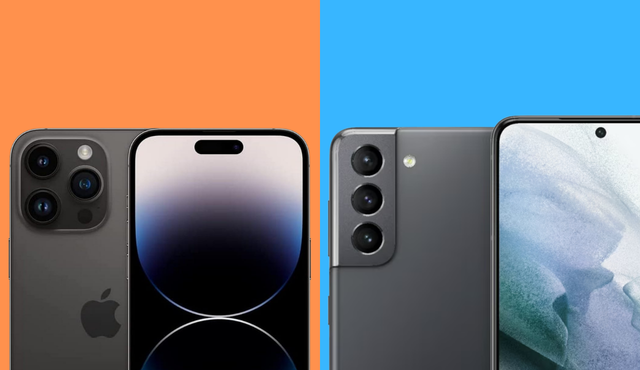
You care about taking better photos with your phone, so this piece cuts straight to what matters: whether an iPhone camera or a Samsung camera better suits your needs. Both platforms deliver excellent results, but they favor different outcomes—iPhone leans toward natural color and consistent processing, while Samsung often pushes punchier, more saturated images and longer optical zooms. If you want true-to-life tones and reliable color rendering, iPhone often wins; if you prefer vivid, social-ready photos and flexible zoom options, Samsung usually delivers.
As you move through camera hardware and lens technology, photo and image quality, zoom capabilities and lens flexibility, and video recording and professional features, you’ll see where each system excels and where compromises appear. Expect side-by-side comparisons that show how sensor design, processing choices, and zoom optics affect portraits, night shots, and high-zoom telephoto images in real-world use.
Keep this practical aim in mind: you’ll learn which phone matches your photographic priorities—natural color accuracy and editorial control, or vibrant images and reach for distant subjects—so you can decide which platform fits how you actually shoot.
Camera Hardware and Lens Technology
You’ll find key differences in sensors, apertures, zoom systems, and how each manufacturer balances size, processing, and ergonomics. These choices directly affect detail, low-light performance, and how natural colors and bokeh appear in your photos.
Sensor and Resolution Breakdown
Samsung often uses larger sensor sizes and higher megapixel counts to capture more raw detail; models like the Galaxy S23 Ultra and Galaxy S24 Ultra use 200MP-class sensors with pixel binning to improve low-light sensitivity and reduce noise. Pixel binning combines adjacent pixels into larger effective pixels, which boosts dynamic range and produces cleaner images at lower light levels. That method helps when you crop or digitally zoom because the base resolution is high.
Apple emphasizes sensor efficiency and per-pixel quality over sheer megapixel numbers. The iPhone 16 Pro and iPhone 16 Pro Max use sensors tuned for consistent color, highlight retention, and better skin tones. Apple’s sensor-shift stabilization and tight integration with the image pipeline often give the iPhone 17 Pro Max an edge in producing usable JPEG/HEIF out of camera with less aggressive sharpening. For you, this means Samsung can win on fine detail and cropping, while iPhone tends to give reliably pleasing images straight away.
Aperture and Low-Light Innovation
Aperture size directly affects how much light your lens admits, and both vendors tune apertures to balance depth of field with low-light performance. Samsung commonly uses wider physical apertures and variable-aperture mechanisms in some flagships to let more light in at night, which pairs with large sensors to lower noise. The Galaxy S26 Ultra rumors and prior Galaxy S series practice show Samsung pushing variable aperture or computational aperture tricks to adapt to scenes.
Apple focuses on consistent optical design plus sensor and software synergy. iPhone models use wider fixed apertures on main cameras and fast sensor readout to improve low-light exposure and reduce motion blur. Your images on iPhone 16 Pro Max will often show controlled noise and well-managed highlights because Apple blends multiple exposures and uses Smart HDR/Photonic Engine to pull detail from shadows. For you, Samsung may excel when raw light and high megapixels matter; iPhone will often give more predictable night photos without post-processing.
Telephoto and Periscope Systems
Samsung has led with periscope telephoto systems, offering long optical zoom ranges on devices like the Galaxy S23 Ultra and Galaxy S24 Ultra. Periscope telephoto lenses use folded optics to achieve higher optical zoom (3x–10x or more) without increasing device thickness. That multiplies your ability to frame distant subjects with real optical detail instead of relying on digital zoom.
Apple has historically used shorter-range telephoto lenses with strong computational support. Recent iPhone Pro Max models expanded telephoto reach and improved stabilization, but periscope-level zoom has been introduced later than Samsung’s. If you need long-range zoom for sports, wildlife, or tight framing, Samsung’s periscope-equipped Galaxy S-series phones typically give you more usable optical zoom. If you prefer consistent color matching and portrait bokeh at moderate zoom, iPhone’s telephoto pipeline remains competitive.
Design and Ergonomics
Lens placement, camera bump size, and button layout affect how you hold and shoot. Samsung’s Ultra models, such as the Galaxy S24 Ultra, often have larger camera modules and pronounced bumps to house big sensors and periscope assemblies. That can make the phone top-heavy; you may want a case with a flat base or grip to steady long-zoom shots.
iPhone Pro models keep module shapes compact and integrate sensor-shift and stabilization into a sleeker package. The iPhone 16 Pro and 17 Pro Max prioritize consistent feel and one-handed reach, which can make prolonged shooting more comfortable. Consider how often you use telephoto zoom or low-light shooting when choosing: Samsung prioritizes maximum optical capability, while Apple favors tighter integration of hardware and ergonomics for everyday handling.
Photo and Image Quality
You’ll see meaningful differences in how iPhone and Samsung render light, color, and subject separation. Expect Apple’s processing to favor natural skin tones and consistent exposure while Samsung often boosts saturation and detail, especially in bright scenes.
Dynamic Range and Color Science
Apple focuses on consistent dynamic range through Smart HDR and Deep Fusion, which combine multiple exposures to preserve highlights and shadow detail. You’ll notice fewer blown highlights in backlit scenes and smoother transitions in midtones, especially in mixed indoor/outdoor light.
Samsung uses higher-megapixel sensors and aggressive tone mapping to deliver punchy, high-contrast images. That yields crisp detail in textured areas but can clip highlights more often than Apple. If you prioritize accurate shadow detail across a wide exposure range, Apple’s multi-frame processing usually holds more information. If you prefer vivid skies and strong local contrast, Samsung’s processing will appeal more.
Portrait Mode and Background Blur
On iPhone, portrait mode prioritizes accurate edge detection and lifelike skin rendering. You get reliable subject separation on faces and consistent background blur across focal lengths, with Apple’s algorithms keeping hair and glasses edges intact more often.
Samsung gives you flexible blur strength and creative bokeh effects, plus wider telephoto reach on flagship models for tighter framing. That flexibility can introduce occasional edge artifacts and over-smoothed skin when the algorithm misidentifies foreground elements. For controlled, natural-looking headshots choose iPhone; for more stylized blur and stronger subject isolation, Samsung is useful.
Night Mode and Low-Light Performance
Apple’s Night mode blends multiple long and short exposures with Deep Fusion-like details to reduce noise while preserving color accuracy. You’ll get balanced exposure with subdued saturation and fewer color casts. Detail retention on complex textures generally remains good without exaggerated sharpening.
Samsung’s night performance often emphasizes brightness and perceived detail, using frame stacking plus aggressive sharpening. Images can look brighter and more detailed at first glance, but you may see higher noise in deep shadows and occasional color shifts. If you want truer nighttime colors and restrained processing, iPhone leans conservative; if you want brighter, punchier low-light shots, Samsung tends to deliver.
Photographic Styles and Natural Skin Tones
Apple’s Photographic Styles (on recent models) let you apply subtle processing preferences per shot while keeping skin tones natural. You can tune contrast or warmth without altering facial color presets, which preserves lifelike skin across scenes. That control integrates with Smart HDR so your chosen style affects all stages of the pipeline.
Samsung offers scene-optimized presets and stronger in-camera tuning that boosts saturation and micro-contrast. That produces eye-catching results but can push skin tones toward warmer or more saturated looks. If maintaining realistic skin color is important for portraits or product images, rely on Apple’s restrained color science. If you want bold, attention-grabbing color for social posts, Samsung’s processing will get you there faster.
Additional reading: detailed real-world camera comparisons between recent iPhone and Samsung flagships illustrate these behavior patterns in side-by-side tests, such as the iPhone vs Samsung camera comparison 2026.
Zoom Capabilities and Lens Flexibility
You’ll find real differences in how each brand handles medium and long-range shots, and in how easily you can switch between focal lengths during a shoot. Pay attention to native optical steps, low-light behavior, and when a phone falls back to digital or cropped-main-lens zoom.
5x and 10x Optical Zoom Tests
When you need a tight frame without losing detail, optical zoom matters most. Many Samsung Ultra models offer native 5x and 10x optical or periscope telephoto options that maintain sharpness and texture at these ranges. That typically yields clearer detail, less noise, and more reliable autofocus at 5x and 10x compared with phones that rely on digital crop.
iPhone models often use a combination of dedicated telephoto lenses and computational cropping. Recent iPhones have improved at 5x with a true telephoto lens on Pro models, but they sometimes switch to the main sensor with digital zoom near 10x, which can soften fine detail in low light. Test at daylight and at dusk to see whether the phone uses optical glass or a software crop, and compare crops at 100% to judge real-world performance.
Versatility Across Lenses
You should evaluate how smoothly the phone moves between ultra-wide, main, and telephoto lenses during a shoot. Samsung tends to include multiple dedicated lenses—ultra-wide, one or two telephotos (often covering 3x, 5x, and 10x equivalents), and very high-megapixel main sensors—so you can jump focal lengths without heavy interpolation. That gives you practical flexibility for landscapes, portraits, and distant subjects.
iPhone systems prioritize consistent color, exposure, and processing across lenses, which helps when you switch quickly between focal lengths for social or editorial work. iPhones often rely on fewer physical zoom steps but stronger computational blending to match tones and detail. If you shoot mixed scenes, check how each phone preserves color and detail when the camera app transitions between lenses, and whether the app lets you lock an optical zoom step (for example, a dedicated 5x button) to avoid unwanted switching.
Video Recording and Professional Features
This section compares practical recording performance, stabilization behavior, codec options, and in-camera directing and editing tools so you can choose the phone that matches your workflow and delivery format.
Video Quality and Stabilization
You get consistently natural color grading and smooth motion with iPhone video, especially in skin tones and highlight handling. Apple’s sensor-readout and color pipeline favor cinematic continuity across lenses, which helps when you cut between wide and tele shots.
Samsung emphasizes resolution and dynamic range, producing punchier contrast and higher-detail frames in well-lit scenes. Its Super Steady modes combine optical and electronic stabilization for aggressive shake removal, which benefits action and handheld shooting.
In low light, both phones use multi-frame stacking, but the iPhone tends to preserve color fidelity while Samsung leans on brightness and sharpening. If you plan multicam cuts, prefer the phone that gives matched exposure and color across focal lengths without heavy post correction.
8K and ProRes Recording Performance
Samsung offers 8K recording on recent Ultra models, giving you high-resolution masters for reframing and cropping. 8K increases file sizes and requires robust storage and editing hardware, so use it when you need large-scale cropping or future-proofing.
Apple supports ProRes on Pro models for higher-bitrate capture with less compression, which simplifies grading and preserves details in highlights and shadows. ProRes files are significantly larger than H.264/H.265 and demand fast storage and a workstation capable of real-time playback.
Choose 8K when pixel-level reframing matters. Choose ProRes when you need color grading flexibility and fewer compression artifacts. Both formats affect battery life, heat, and storage; plan your shoot with external drives or offload strategies.
Cinematic and Director’s View Modes
Cinematic Mode on iPhone uses depth-mapping and subject detection to create rack-focus and shallow-depth looks in-camera, with editable focus changes after capture. It works best in controlled lighting and for narrative-style shots where you want lens-like focus pulls without a gimbal or follow focus.
Samsung’s Director’s View gives you multi-camera monitoring and on-the-fly switching, letting you record from front and rear lenses simultaneously and choose angles in real time. It fits live content creators and multi-angle interviews who need immediate compositing without heavy post.
Both systems offer autofocus subject tracking; the iPhone prioritizes smooth, filmic focus transitions while Samsung prioritizes flexibility and angle control. Pick Cinematic Mode for single-shot storytelling and Director’s View for multi-camera workflows and live switching.
Editing Tools for Videographers
Apple integrates strong on-device editing with Clips and iMovie plus seamless ProRes workflow into Final Cut, so you can start edits on the phone and finish on desktop with preserved color metadata. Built-in LUT support and color controls aid quick grades before export.
Samsung bundles robust in-phone editors and AI-assisted enhancements for stabilization, denoise, and color balance, plus easy exporting optimized for social platforms. Samsung’s tools often include automatic reframing and scene-aware adjustments that speed social-post workflows.
If you rely on external color grading, prioritize capture formats that retain metadata and chroma detail—ProRes on iPhone or high-bitrate H.265/8K on Samsung. For on-phone finishing, test each phone’s editor with your typical footage to ensure the workflow matches your turnaround needs.