

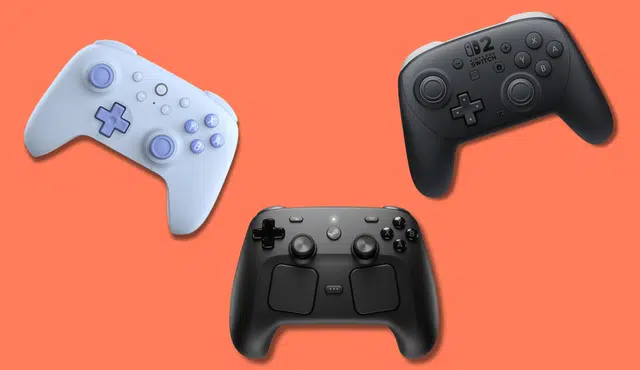
You buy a controller for many practical reasons. Your gaming PC does not include one, your console only ships with a single pad, and competitive play can wear out even durable hardware. If you play fighting games, you may prefer a fight stick or a leverless layout instead of a standard gamepad. Modern wireless controllers and Bluetooth controller options also give you more flexibility across PC, console, and mobile platforms.
The latest updates refine the field with new additions such as the 8BitDo Pro 3, Razer Raiju V3 Pro, Valve Steam Controller, and dedicated fight sticks like the Qanba Drone 2 and Victrix Pro models. Several older picks have been retired to keep the list current and widely available. You can use this guide to narrow down the right controller for your platform, budget, and play style.
8BitDo Pro 3
Why We Chose It
You get premium hardware at a midrange price. At $69.99, this controller includes features that often appear on models that cost far more.
It uses TMR joysticks with hall effect sticks design to reduce wear and improve long-term accuracy. You also get Hall Effect triggers, programmable rear paddles, motion controls, and vibration.
The package includes a dedicated charging dock, which keeps the controller stored and powered. Few controllers at this price ship with a cradle.
You can swap ABXY buttons to match Nintendo or Xbox layouts, and change analog stick caps for a different feel. The controller connects through Bluetooth or a 2.4GHz USB adapter and supports:
- Windows
- macOS
- Steam Deck
- Nintendo Switch
- Nintendo Switch 2
Early coverage from PCMag’s best video game controllers list highlights how much hardware you receive for the price.
Who Should Buy It
If you play on PC, Switch, or Switch 2, you can use one controller across all of them. That flexibility makes it a strong option under $100.
You also benefit from the charging dock if you tend to misplace controllers or forget to plug them in. The cradle keeps it visible and ready.
Players who prefer a retro-inspired shape with modern internals will appreciate the balance of classic design and updated components.
8Bitdo SN30 Pro
8BitDo builds the SN30 Pro around the familiar SNES “dog-bone” shape but fits it with modern controls. You get dual analog sticks, four shoulder triggers, clickable sticks, and wireless Bluetooth support across multiple platforms.
Recent versions use Hall-effect analog sticks, which resist drift and extend stick lifespan. The controller connects to Windows, macOS, SteamOS, iOS, iPadOS, and Nintendo Switch systems through Bluetooth, giving you broad compatibility in a compact frame.
Why It Earned a Spot
You get a full contemporary layout inside a classic shell. That combination lets you play 2D retro titles and modern 3D games without switching controllers.
The Hall-effect sticks improve durability compared to traditional potentiometer designs. You also benefit from a lightweight build that fits easily into a backpack or travel case.
Key strengths:
- SNES-inspired layout with modern inputs
- Dual analog sticks with Hall-effect sensors
- Wide Bluetooth device support
Who Should Consider It
If you enjoy retro games but still want full analog control, this pad gives you both. The button placement mirrors classic Nintendo layouts, which helps if you grew up with 16-bit systems.
You will also appreciate it for travel. The slim profile skips large grips, so it packs easily, though larger hands may prefer a controller with fuller handles.
Nintendo Switch 2 Pro Controller
Why We Chose It
You need a controller built specifically for Switch 2, since older Switch accessories no longer work with the new system. Nintendo designed the Switch Pro Controller for Switch 2 to match the updated hardware while keeping the familiar layout many players prefer.
You get large face buttons, full‑size analog sticks, a responsive D-pad, and integrated motion controls for supported games. Two programmable rear buttons add flexibility for custom inputs. The shape feels balanced in your hands, making it suitable for longer sessions.
Who Should Buy It
You benefit most if you want first‑party compatibility and built‑in Amiibo support.
The controller lets you scan figurines directly, a feature many third‑party gamepads do not offer.
Qanba Drone 2
Why It Earned Our Selection
You get a step-up entry-level arcade stick that works with PlayStation 5, PlayStation 4, and PC. It costs more than ultra-budget options, but it adds practical features that improve everyday use.
Notable features include:
- Textured, anti-slip strips on the base
- Full PlayStation control panel with Share button
- Integrated touchpad
- Built-in headset jack
- Internal compartment for storing the USB cable
These additions give you a cleaner setup and better stability during long sessions.
Who Should Consider It
You should look at this stick if you are new to arcade controllers and want a reliable starting point. At $99.99, it stays accessible while offering a build that feels closer to higher-tier fight sticks.
It suits players who want to try competitive fighting games without committing to premium pricing.
Razer Raiju V3 Pro
Why It Earned a Spot
You get a controller built for competitive precision rather than extra immersion features. The Raiju V3 Pro mirrors Razer’s high-end PC and Xbox design philosophy, delivering a comfortable shape with sculpted bumpers that support claw grip play without strain.
It focuses on performance essentials:
- TMR thumbsticks for accuracy and durability
- Up to 2,000Hz polling rate on PC for reduced input delay
- Mechanical-style inputs tuned for responsiveness
- Integrated PS5 trackpad
You won’t find adaptive triggers or advanced haptics here. Razer trims those features to prioritize fast response and consistency, which aligns with impressions from this Razer Raiju V3 Pro review. The result feels purpose-built for serious play rather than cinematic feedback.
Who Should Consider It
You should look at this controller if you compete on PS5 and want more customization than the standard DualSense offers. As detailed in this Razer Raiju V3 Pro Controller Review, it supports swappable thumbsticks, multiple programmable rear buttons, and includes a carrying case for travel.
It also suits long gaming sessions. While many stock PS5 controllers last roughly six to eight hours, this model can reach up to 36 hours of battery life on a single charge.
If you value extended playtime, rear button control, and a firm, performance-focused feel, this controller matches those priorities.
Valve Steam Controller (2026)
Valve redesigned its controller with a sturdier frame and a layout that mirrors the Steam Deck. You get a more conventional grip, tighter button placement, and improved materials that feel durable during long sessions.
Dual TMR analog sticks sit alongside responsive haptic trackpads, giving you multiple input options. If you prefer motion aiming, you can enable built‑in gyro controls.
A magnetic charging dock doubles as a wireless receiver, so you can keep the controller powered and connected without extra clutter.
Why It Stands Out
- Improved build quality with a more practical layout
- Dual input flexibility: TMR sticks, trackpads, and gyro
- Charging puck + wireless transmitter in one accessory
- Deep software customization within Steam
You can switch between traditional stick control and touchpad input depending on the game. The configuration tools inside Steam let you remap buttons, adjust sensitivity, and download community layouts.
Who Should Buy It
This controller fits you best if most of your library lives on Steam.
You can use it on a PC or Steam Deck and take advantage of detailed per‑game profiles. Compatibility outside Steam varies, so you should expect limited or inconsistent support for titles from other platforms.
Victrix Pro FS
Why It Stands Out
You choose the Victrix Pro FS when you want premium construction and tournament‑ready components. Its aircraft‑grade aluminum unibody gives the chassis a rigid, durable feel that resists flex during intense matches.
It uses Sanwa Denshi arcade parts, including a removable ball‑top joystick, and adds practical touches like a lock switch to prevent accidental button presses. Integrated LED lighting provides visual customization without affecting performance.
Multiple reviews highlight its top‑tier build and pro focus, including this detailed Victrix Pro FS review. You can buy it in purple or white for PlayStation 5, PlayStation 4, and PC compatibility.
Who Should Buy It
You benefit most if you travel to events or want hardware that can handle accidental drops. The single‑piece aluminum frame adds impact resistance compared to plastic sticks.
It also suits players who like to customize. The stick includes a detachable joystick, an included Allen wrench, and an easy‑access interior panel, features noted in this roundup of the best video game controllers for every platform.
Victrix Pro KO
Why It Stands Out
You get a travel-friendly leverless controller that balances low weight with solid construction. At 2.7 pounds, it stays portable, yet the aluminum top plate and rubberized base give it a stable, planted feel during intense matches.
The chassis uses a subtle 6.2-degree wrist incline and tapers to about 0.8 inches thick, which keeps your hands in a natural position. That design supports long practice sessions without adding bulk to your setup.
You can use it across PC, PlayStation 5, PlayStation 4, and Xbox Series X/S, so you avoid switching controllers between platforms.
Who Should Consider It
You benefit most if you prioritize comfort. The controller measures 13.3 inches wide and 9.2 inches deep, giving your hands room to move without crowding the buttons. The layout keeps inputs within reach while preserving spacing for accuracy.
You also gain flexibility if you like to customize your gear. The unit includes hot-swappable MX Speed Silver RGB switches, a removable aluminum top plate, and support for RGB adjustments through the Victrix Control Hub app. It supports up to 16 movable and programmable buttons, with 12 pre-installed and four stored inside.
If you compete, built-in safeguards help prevent avoidable issues. A tournament lock switch disables non-essential inputs, and the 9.8-foot braided USB cable secures with a locking mechanism to reduce accidental disconnects.
Xbox Design Lab
Xbox Design Lab lets you build a custom Xbox wireless controller for about the same cost as a standard model. You choose colors for the faceplate, triggers, thumbsticks, and buttons, then add options like rubberized grips or a laser-etched name.
You can start designing directly through the official Xbox Design Lab tool.
Why It Earned a Spot
You control nearly every visible detail of your controller.
- Color customization across major components
- Optional textured grips for added control
- Personal engraving for a unique touch
If you want advanced hardware, you can upgrade to a customized Elite version with swappable metal components and expanded color choices.
Who Should Consider It
You benefit most if you play on Xbox consoles or Windows PCs and want a controller that reflects your style.
As a first-party device, it connects easily and supports built-in features like button remapping and multiple control profiles on compatible models.
Xbox Elite Wireless Controller Series 2
Why We Chose It
You get one of the most advanced first‑party controllers available for Xbox and Windows PCs with the xbox elite series 2. It includes interchangeable thumbsticks and D‑pads, removable rear paddles, and deep button mapping through the Xbox Accessories app.
The package also adds practical extras:
- Hard carrying case
- Charging dock and cable
- Adjustable stick tension
- Custom profiles saved to the controller
The premium price of $199.99 reflects its build quality and feature set. If you want hardware-level customization and flexible control layouts, this controller delivers consistent performance across console and PC.
Who Should Buy It
You should consider this controller if you play competitively or spend long hours gaming on Xbox or PC. It suits players who want tighter input control and programmable rear paddles for faster actions.
The included case and charging cradle keep your setup organized and ready whether you play at home or travel.