

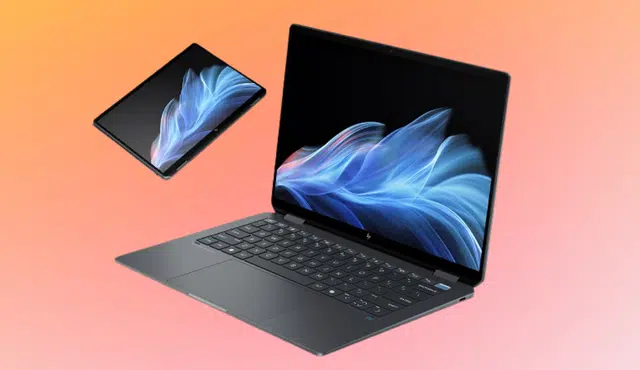
Upgrading your laptop or clearing out unused tech makes sense when you know you can turn it into cash. If you want to sell your HP OmniBook without dealing with listings, meetups, or uncertain buyers, you can use a structured online trade‑in service.
You can sell your HP OmniBook with Gizmogo by getting an online quote, shipping your laptop for free, and receiving payment after inspection. The process focuses on convenience, secure handling, and straightforward pricing based on your device’s model and condition.
As you move forward, you’ll see how to increase your OmniBook’s resale value and what to expect during each step of the selling process, so you can approach the transaction with clarity and confidence.
Maximizing Value When Selling HP OmniBook Laptops
You increase your payout when you understand your model, know how the trade-in process works, and prepare your device correctly. Clear specs, strong condition, and accurate details directly affect the offer you receive.
HP OmniBook Ultra Flip and Next Gen AI Models Overview
The HP OmniBook line includes premium 2‑in‑1 and performance-focused laptops designed for productivity and portability. Models like the HP OmniBook Ultra Flip and HP OmniBook Ultra Flip 14 stand out because they combine a convertible design with modern processors such as Intel Core Ultra chips.
These systems often qualify as a next gen AI laptop due to integrated neural processing units and advanced power management. Buyers and trade-in platforms value:
- Intel Core Ultra processor tier
- RAM capacity (16GB or higher commands stronger offers)
- SSD size and type
- Touchscreen and 2‑in‑1 hinge condition
If you own a newer OmniBook Ultra Flip, you typically receive a higher offer than for older Pavilion or entry-level HP models. Premium build materials, updated CPUs, and current market demand all influence resale value.
You can check eligibility and pricing directly through pages like the Sell HP OmniBook Ultra Flip 14 Next Gen AI listing to see how specific configurations are evaluated.
Understanding Trade-In Processes and Same-Day Payment
When you use structured trade-ins, you follow a defined process: enter your model details, receive a quote, ship the device, and get paid after inspection. Platforms that specialize in HP devices streamline this workflow.
With programs such as the HP laptop trade in & buy back program, you receive an upfront value based on condition and specs. After the company verifies your device matches your description, it releases payment.
Many buyers prioritize same-day payment once inspection is complete. That timing matters if you plan to fund a new laptop purchase immediately.
To avoid quote changes:
- Describe cosmetic wear accurately.
- Disclose screen defects or battery issues.
- Confirm the exact CPU and storage configuration.
Accurate submissions reduce delays and protect your original offer.
Key Factors That Influence Your Offer
Your final price depends on measurable factors, not guesswork. The most important variables include hardware tier, cosmetic condition, and market demand.
Core drivers of a higher offer:
- Newer generation Intel Core Ultra processors
- 16GB–32GB RAM configurations
- 512GB or 1TB SSD storage
- No cracks, dents, or display blemishes
- Fully functional keyboard, ports, and touchscreen
Even small defects affect value. A damaged hinge on an OmniBook Ultra Flip can significantly reduce resale potential because the 2‑in‑1 mechanism is central to its design.
Market data shows how pricing varies by category. For example, budget HP laptops often sell in much lower ranges, such as those outlined in this breakdown of how much you can sell a used HP laptop for. Premium OmniBook models typically sit above entry-level devices because of stronger specifications and newer release cycles.
How to Prepare Your Device for Sale
Preparation directly affects inspection results and payout speed. Take concrete steps before shipping your HP OmniBook.
Complete this checklist:
- Back up files to cloud storage or an external drive.
- Sign out of Microsoft, Google, and other accounts.
- Perform a full factory reset through Windows settings.
- Remove device encryption or confirm reset completion.
- Clean the screen, keyboard, and chassis with a microfiber cloth.
If you still have the original charger, include it. Accessories can support a stronger valuation.
Pack your laptop in a rigid box with padding around all edges. A secure shipment prevents damage that could lower your offer during inspection.
If you want a streamlined selling route tailored to HP devices, you can review the process to sell HP laptops for top cash online and compare your quote before committing.
Gizmogo Selling Experience: Step-by-Step Guide
You move from quote to payment through a defined online process designed for speed and clarity. Each step focuses on accurate pricing, free shipping, and secure handling of your HP OmniBook.
Getting an Instant Quote and Fast Payments
You start by selecting your exact OmniBook model on the official Sell HP Laptop page on Gizmogo. Then you enter key details such as storage capacity, processor type, and physical condition.
The system calculates an instant quote based on the information you provide. Pricing reflects model specifications, market demand, and device condition. You see the offer before you commit, so you stay in control.
After you accept the quote and ship your device, Gizmogo inspects it to confirm the details match your submission. If everything checks out, you receive fast payment, often within one business day after approval.
Available payment methods typically include:
- PayPal
- Check by mail
- Other listed payout options at checkout
You avoid in-person negotiations and pricing uncertainty. The quote you accept becomes the amount you receive once the device passes inspection.
Free Prepaid Shipping Label and Hassle-Free Process
After accepting your quote, you receive a prepaid shipping label. You print it at home and attach it to your package.
You do not pay out of pocket for shipping. This reduces your total cost and removes a common barrier to selling electronics online.
Before shipping, you should:
- Back up your files
- Sign out of all accounts
- Perform a factory reset
- Remove accessories you want to keep
Pack your HP OmniBook securely in a sturdy box with padding to prevent damage during transit. Drop it off with the designated carrier listed on the label.
This structured process keeps each step clear. You know when to ship, how to ship, and what happens next.
Secure Transactions and Data Protection
When you sell your HP OmniBook, data security matters. You remain responsible for backing up and wiping your files before shipping.
Gizmogo states that it follows strict data handling procedures and erases remaining data after inspection. You can review their broader electronics trade-in process on the Gizmogo homepage for selling used electronics.
You also benefit from:
- Transparent pricing with no hidden fees
- Clear communication during inspection
- The option to decline a revised offer if device condition differs
If the inspection reveals a mismatch, you receive an updated quote. You can accept the new offer or request your device back.
This structure protects both your payment and your personal information while keeping the transaction straightforward and documented.