

Finding Your Android Phone's IMEI Number: Two Easy Methods Your phone's IMEI (International Mobile Equipment Identity) number is a unique 15-digit code that identifies your device. It's like a digital fingerprint and can be crucial for various reasons, such as reporting a lost or stolen phone, verifying warranty information, or even checking device compatibility. Thankfully, finding your IMEI number on an Android device is a simple process. Here are two quick and easy methods.
Get an instant quote for your iPhone by using Gizmogo’s IMEI Checker.
2 Easy Ways to Find Your Android's IMEI Number
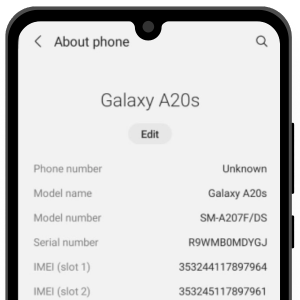
1. Via the Settings App
- Open Settings > About phone
- Scroll down to find the IMEI number.
- Tap and hold the number to copy it.
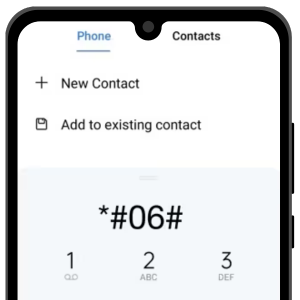
2. Using the Phone App
- Open the Phone app.
- Dial *#06# and the IMEI will appear on your screen.
Gizmogo's IMEI Checker
By following these steps, you can quickly locate your iPhone’s IMEI number whenever you need it. Use Gizmogo’s IMEI Checker to see how much you can sell your iPhone.
Related posts:
Sell iPhone Today: Get the Best Deals from Gizmogo
Phones
Will the Nintendo Switch 2 Be Affordable?
Phones
Selling Xbox One – Try Gizmogo for Cash
Phones
All the right options for trading in electronic devices on Gizmogo
Phones
How Storage Capacity Affects Resale Value
Phones
Does buying an iPhone 12 now make sense or should you wait for the iPhone 13?
Apple