

Learn how to quickly find your iPhone's IMEI number using settings, your Apple ID, or even the SIM tray. Step-by-step instructions included! Knowing your iPhone's IMEI (International Mobile Equipment Identity) number is essential for unlocking your phone, reporting it lost or stolen, or getting support. Here's a quick guide to help you locate it easily.
Get an instant quote for your iPhone by using Gizmogo’s IMEI Checker.
7 Easy Ways to Find Your iPhone's IMEI Number
1. Via the Settings App
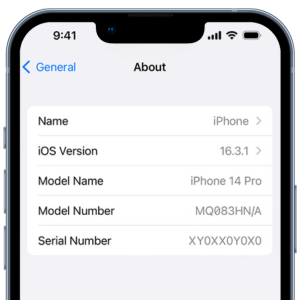
- Open Settings > General > About.
- Scroll down to find the IMEI number.
- Tap and hold the number to copy it.
2. Using the Phone App
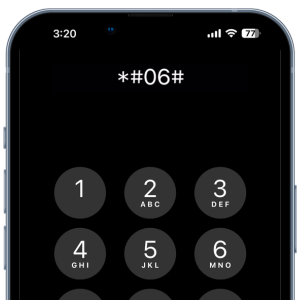
- Open the Phone app.
- Dial *#06# and the IMEI will appear on your screen.
3. Check the SIM Tray
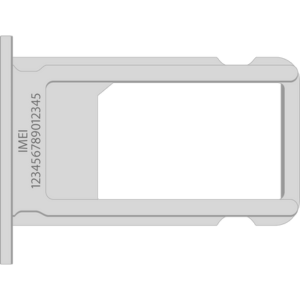
- Eject the SIM tray using an ejector tool or paper clip.
- Look for the IMEI printed on the tray. (Note: iPhone 14 and later models in the United States do not have a SIM tray.)
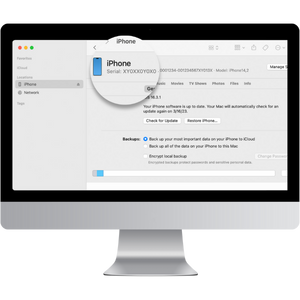
4. Finder and iTunes on Mac
- Connect your iPhone to a Mac
- Finder: Open Finder and select your device’s name. Make sure you are on the General tab.
- iTunes: Open iTunes and click on the iPhone icon, then go to the Summary tab.
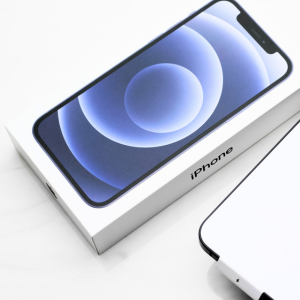
5. Check Your Original Packaging
If you still have your iPhone’s original packaging, you can find the IMEI printed on the back.
6. Apple ID Page
- Visit account.apple.com in a web browser and sign in.
- Under Devices, select your iPhone.
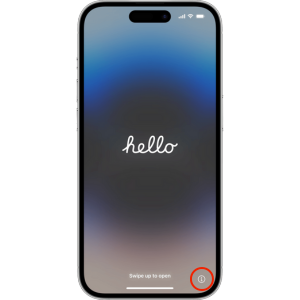
Bonus Tip: Find It on the "Hello" Screen
If your iPhone is reset and showing the “Hello” screen, tap on the small “i” icon in the bottom-right corner.
Gizmogo's IMEI Checker
By following these steps, you can quickly locate your iPhone’s IMEI number whenever you need it. Use Gizmogo’s IMEI Checker to see how much you can sell your iPhone.
Related posts:
Will the Nintendo Switch 2 Be Affordable?
Phones
Looking to Buy a Gaming Laptop? Top Options in a Budget
Phones
Sell Old Cell Phones Near Me: Why Gizmogo Is the Smart Choice
Phones
Sell Samsung Galaxy Z Flip Online
Sell Your Android
New Xbox Series S|X Consoles Arriving This October
Phones
Upgrading? How to Sell Your Old Device First
Phones