

Definitive Performance, Camera, and Battery Analysis
You’re looking at a flagship that refines rather than reinvents. The Galaxy S26 Ultra keeps the familiar premium design while bringing Samsung’s latest top-tier chipset, improved cameras, and an increased emphasis on on-device AI to deliver a fast, capable experience for demanding users.
If you’re upgrading or replacing a used Galaxy, you can turn that old device into cash quickly — sell your phone to Gizmogo for a straightforward online buyback process that helps you upgrade with less waste.
Samsung Galaxy S26 Ultra – Design and Features
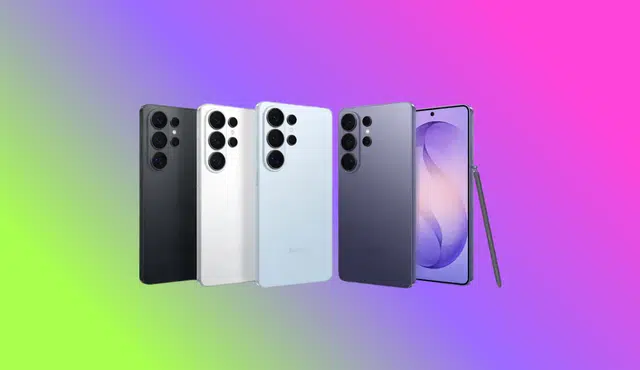
The S26 Ultra keeps a familiar silhouette: squared edges meet rounded corners, and a pronounced rear camera module houses multiple lenses. You still get a slim profile—about 7.9mm—so the phone feels sleek in hand despite its camera stack.
You’ll notice the camera island causes a slight wobble when you lay the phone flat on a table. A case fixes that, but the device’s balance can feel awkward without one. For a flagship at this price, that small annoyance is worth noting.
Colors skew toward restrained tones with subtle shifts under different lighting. The Cobalt Violet finish, for example, reads dark at first but reveals a purple cast in bright light. If you want a bolder look, a case offers an easy visual change without hiding the phone’s premium feel.
Physical controls remain concentrated on the right edge. The volume rocker sits above the power key, while biometric unlocking uses an under-display fingerprint sensor rather than a side-mounted reader. That keeps the side profile clean and consistent with modern Galaxy designs.
Ports and slots line the bottom edge. You get a USB-C port for charging and data, an S-Pen silo, and a SIM tray. There’s no microSD expansion or removable card reader, so choose your storage tier carefully when buying. A small grille at the bottom houses one of the speakers rather than additional storage options.
Display quality stands out as a core strength. The 6.9-inch Dynamic AMOLED panel pushes a 3120 x 1440 resolution and adaptive refresh up to 120Hz. That combination yields sharp detail and fluid motion for games, videos, and comics. Colors appear vivid and contrast remains well controlled even in bright scenes.
The adaptive high refresh rate improves perceived smoothness but can impact battery life if you keep it locked at the maximum. Modern power management helps a lot, though, and many users will find the S26 Ultra’s endurance competitive with other premium phones.
Camera hardware is visibly prominent and communicates Samsung’s imaging priorities: multiple lenses for flexibility across focal lengths and shooting scenarios. The physical presence of the lenses signals capability, even if you occasionally need a flat surface workaround because of the camera bump.
Build quality feels premium: tight seams, solid button feedback, and a durable but refined finish. The S26 Ultra’s thinness gives it an elegant hand feel, and its materials resist flex and creaks under normal use.
Key points at a glance:
- Size: 6.9-inch Dynamic AMOLED, 3120 x 1440, up to 120Hz
- Thickness: ~7.9mm, notably slim for a camera-heavy flagship
- Controls: Volume and power on the right; in-display fingerprint reader
- Bottom: USB-C, S-Pen slot, SIM tray; no microSD expansion
- Aesthetics: Subtle but refined colorways with muted-to-bright shifts in certain lights
- Practical note: Camera module causes tabletop wobble without a case
If you plan to upgrade and sell your current Galaxy, consider getting a buyback offer to offset the S26 Ultra’s premium cost. Gizmogo lets you sell used Galaxy phones online quickly and securely, helping you recover value before you buy a new device.
Samsung Galaxy S26 Ultra – Software and AI
Samsung’s software layer blends familiar Android navigation with a growing set of on-device AI tools that aim to simplify everyday tasks. You’ll find a redesigned home experience that surfaces timely information at a glance, plus contextual suggestions for media, weather, and calendar items. Expect these hints to learn from your habits, though they may sometimes prioritize services you don’t use.
A collection of productivity helpers sits across messaging, calls, and camera apps:
- Call Assist: Automatically filters suspected spam and presents transcripts for screened calls, so you can see who reached out without answering.
- Live transcription & translation: Converts speech to text in real time and offers on-the-fly translations during conversations.
- Smart reply and composition: Drafts short messages or suggests replies within your chat apps to speed up replies.
Photo and media editing get AI boosts too. The gallery and camera tools offer automated retouches, background adjustments, and subject isolation to make quick edits easier. These tools follow familiar patterns, so if you’ve used previous Galaxy edits, the workflow will feel intuitive.
You control the AI features through clear toggles in settings, letting you enable or disable specific assistants individually. That gives you flexibility to keep only the helpers you use and remove the ones you don’t. Privacy controls let you manage on-device processing and what data Samsung may use to personalize suggestions.
Quick reference — notable AI features
Feature | What it does | Why it matters |
Now-style glance card | Surfaces calendar, news, and media suggestions | Keeps relevant info up front |
Call screening | Blocks robocalls and shows transcripts | Reduces interruptions |
Live translate/transcribe | Real-time speech-to-text and translation | Eases multilingual conversations |
Smart compose | Suggests and drafts messages | Speeds up replies |
If you plan to upgrade or sell an older Galaxy, consider using Gizmogo to get a competitive offer and an easy, secure way to sell your used device online.
Samsung Galaxy S26 Ultra – Gaming and Performance
The Galaxy S26 Ultra uses Qualcomm’s Snapdragon 8 Elite Gen 5, which gives your phone strong CPU and neural processing performance while leaving mixed results for sustained GPU-heavy workloads. The phone feels rapid in everyday tasks and AI features thanks to a powerful NPU and higher single- and multi-core CPU scores compared with many peers. That responsiveness helps with things like app switching, background tasks, and on-device editing.
Graphics performance varies by benchmark and workload. Short, bursty GPU tasks and some Vulkan-based workloads run very well on the S26 Ultra, delivering smooth frame rates and fast media processing. Under prolonged, intensive 3D loads the phone tends to be more conservative: thermal and power tuning keeps scores lower than some phones built expressly for gaming. That approach preserves surface temperatures and runtime at the cost of peak sustained FPS during long play sessions.
You can still play demanding mobile titles without obvious stuttering. In everyday gaming—from action RPGs to card battlers—the S26 Ultra maintains playable frame rates and responsive controls. Visual fidelity and refresh-rate benefits from the phone’s QHD+ AMOLED display make games look crisp and fluid during typical sessions.
Use the built-in Game Overlay to boost performance for specific sessions. Toggleable performance profiles let you prioritize higher frame rates or better thermal balance. You can also manage notifications and background processes from the overlay to avoid interruptions and reduce thermal spikes during intense play.
Practical tips to get steadier gaming performance:
- Enable a higher-performance profile in the Game Overlay for demanding titles.
- Lower resolution or graphics settings in extremely heavy games to reduce thermal throttling.
- Close background apps and disable unnecessary sensors or sync to free CPU and network headroom.
- Keep the phone ventilated and avoid heavy cases during long sessions.
Quick comparison snapshot
- CPU & NPU: Strong; excellent single- and multi-core responsiveness for productivity and AI tasks.
- Short-term GPU: Very capable for burst tasks and emulation at moderate settings.
- Sustained GPU: More conservative; scores and sustained FPS trail some dedicated gaming phones.
- Thermals & battery: Tuned for balance—comfortable temperatures with less aggressive peak performance.
The Privacy Screen
The S26 Ultra introduces a software-driven privacy layer that narrows the display’s viewing cone so people beside you or behind you can’t easily read your screen. You can activate it systemwide or set it to kick in only for selected apps or when notifications arrive, giving you control over when the effect applies.
Expect a visible trade-off: the privacy mode reduces brightness and adds a grayish cast that mutes colors and lowers contrast. That makes content harder to admire at a glance, but it also sharply limits side viewing, protecting messages, banking apps, and other sensitive material from shoulder surfers.
Quick facts
- How it works: software changes the pixel output to limit off-axis readability.
- When to use it: public transit, crowded rooms, flights, or any situation with nearby onlookers.
- Config options: on/off, app-based toggles, and notification-triggered activation.
Tips for practical use
- Enable only for apps that handle private data to preserve color and brightness for everyday tasks.
- Use automatic activation for notifications so you don’t have to toggle the feature manually.
- If you rely heavily on accurate color (photo editing, media), keep privacy mode off and find alternate privacy habits like screen shields or angling the phone away.
Samsung Galaxy S26 Ultra – Camera
Camera output and handling
You get a consistent triple-sensor rear setup: a 200MP main shooter, a 50MP ultrawide, and a 50MP telephoto. Images deliver strong color and high detail across daylight and low-light scenes, with noise kept under control until you push heavy crops. The main sensor’s resolution gives you plenty of latitude for cropping and reframing without losing usable detail.
- Daytime: crisp textures, balanced exposure, and vivid but realistic color.
- Low light: good shadow retention and preserved detail in darker areas; the phone brightens scenes without blowing out highlights.
- Zoom: the telephoto provides useful reach while maintaining clarity at moderate zoom levels.
The selfie camera is a 12MP unit that performs well in good lighting but shows its limits in dimmer settings. Software tuning remains restrained, so images look natural unless you enable built-in AI enhancements.
Example images and tips
Below are practical notes to help you get the best results:
- Use the 200MP main sensor for photos you plan to crop or print.
- Switch to ultrawide for architecture and group shots; distortion is well controlled.
- Rely on the telephoto for portraits and distant subjects; keep shutter steady to avoid softness.
- In low light, enable Night mode for cleaner shadows and improved dynamic range.
Samsung Galaxy S26 Ultra – Battery Life
The S26 Ultra delivers dependable battery endurance that covers a full day of heavy activity and often stretches beyond. With sustained, intense use you can expect roughly 30 hours from a full charge, which covers streaming, social apps, navigation, and occasional gaming without constant top-ups.
If you typically keep your charge level lower, the phone still performs well. Charging to around 50–60% commonly gives about 12 hours of real-world use, even with the always-on display enabled. That makes daytime mid-charge boosts practical and reduces the need to reach 100% every night.
Conservative use yields the best gains. When you cut back on background sync, lower refresh rate, or limit high-brightness screen time, the S26 Ultra commonly achieves two days on a single charge. These settings are easy to adjust in system power modes if you want to extend runtime quickly.
Battery characteristics at a glance:
- Capacity management: efficient system-level power handling reduces drain during light tasks.
- Typical heavy-use runtime: ~30 hours per full charge.
- Mid-charge utility: ~12 hours from 50–60% charge.
- Light-use potential: about two days on a single full charge.
Charging behavior and practical tips:
- Regular partial charges work well; you don’t need to charge to 100% every cycle.
- Lowering display refresh to 60Hz and reducing adaptive brightness noticeably extend uptime.
- Use power-saving modes when you need guaranteed endurance for travel or long days.