

If you’re buying or selling a used phone, Gizmogo’s online IMEI number checker gives you a quick way to verify a device’s history and authenticity. Enter the IMEI and you’ll see whether the phone is blacklisted, which carrier it’s tied to, and basic model and warranty details — helping you avoid stolen or misrepresented devices.
This tool works in seconds and fits naturally into any pre-purchase or resale checklist, so you can act with confidence when a deal looks too good to pass up. The article will explain how the checker pulls data, what the results mean for your transaction, and why running an IMEI check protects your money and peace of mind.
How Gizmogo's Online IMEI Number Checker Works
Gizmogo’s tool lets you verify a device by entering its IMEI, MEID, or serial number to reveal blacklist status, carrier lock, model details, and warranty indicators. You can find the IMEI on the device, packaging, or with system codes, then run a free IMEI check in minutes.
What Is an IMEI and Why It Matters
The IMEI (International Mobile Equipment Identity) is a unique numeric identifier for most mobile devices. It distinguishes one handset from another and ties the device to global registries that report stolen, lost, or blocked status.
You should use the IMEI before buying or selling to confirm a device isn’t blacklisted or reported stolen. The IMEI also helps verify that reported specs, model name, and origin match the physical unit and serial number.
Gizmogo accepts IMEI, MEID, and EID inputs for eSIM-capable devices. That means you can check legacy MEID numbers on CDMA phones and modern EIDs for eSIM profiles. Accurate IMEI checking reduces fraud risk and avoids devices that won’t activate on your carrier.
How to Locate Your IMEI Number
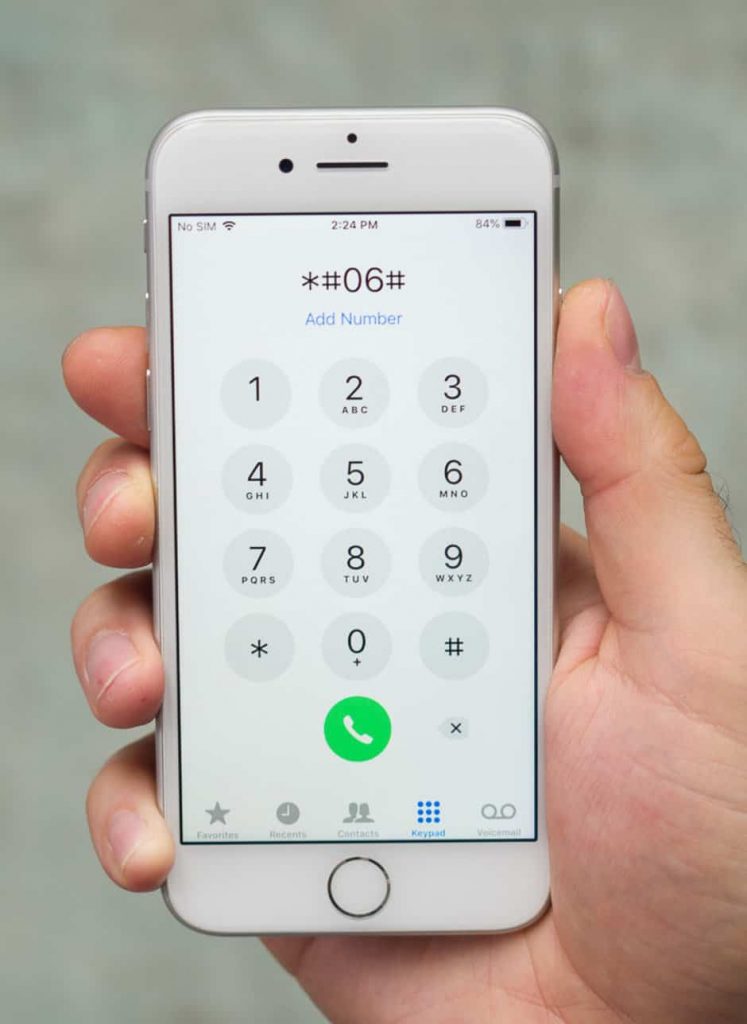
You can quickly display the IMEI on most devices by dialing *#06#; the code works on iPhone and Android. The IMEI also appears in Settings: Settings > General > About on iPhone, and Settings > About Phone or Status on Android.
Inspect the device physically for stickers on the SIM tray, under the battery (on removable-battery phones), or on the original box where the barcode lists IMEI and serial number. Retail receipts and seller listings sometimes include the IMEI or MEID; confirm it matches the device.
For eSIM phones, the EID appears in Settings under eSIM or Cellular settings. If you plan an IMEI lookup for warranty or activation checks, copy the full number exactly; truncation or mistyped digits can produce incomplete or incorrect results.
Step-by-Step Guide to Using Gizmogo’s IMEI Checker
Open Gizmogo’s IMEI check page and locate the IMEI input field. Enter the full IMEI, MEID, EID, or serial number—do not add spaces or extra characters—and submit the form to start the free check.
Wait for the report to load; results typically return within seconds. The checker queries multiple sources and registries to flag blacklist status, carrier locks, and activation/warranty indicators. Review each line item: blacklist/blocked status, reported carrier, model and hardware match, and any theft/loss flags.
If a problem appears, request proof of purchase or a matching serial from the seller before completing a transaction. You can also use the IMEI lookup to confirm that an advertised model and specs match the device’s hardware and warranty status.
Key Features and Information Provided
Gizmogo’s report highlights whether the IMEI is blacklisted (stolen/lost), the current carrier lock status, and the exact model identification. It lists the device’s serial number, MEID/EID where applicable, and whether the device supports eSIM.
The checker often shows warranty or activation indicators and basic hardware specs so you can confirm the device matches the seller’s description. The service is offered as a free IMEI check, with options to request further assistance for trades or selling through Gizmogo.
Use the provided details to validate a purchase, confirm carrier compatibility, and avoid devices that won’t activate on your network. Keep a saved copy of the IMEI lookup for your records when buying or selling used phones.
Why Check IMEI Before Buying or Selling Devices Online
Running an IMEI check saves you time and money by revealing blacklist status, carrier locks, warranty dates, and activation locks tied to the device’s unique ID. You’ll learn whether a phone is stolen, under a payment plan, locked to a carrier, or still under warranty before you commit funds or list the device for sale.
Preventing the Purchase of Stolen or Blacklisted Phones
You must confirm the device isn’t on a blacklist maintained by carrier databases or global GSMA lists. A blacklist check flags phones reported as lost, stolen, or tied to unresolved insurance claims; carriers will often refuse activation of those IMEIs.
If a seller refuses to give the IMEI or gives inconsistent numbers, treat that as a red flag. Use that 15-digit IMEI to run a lookup through a reliable checker (for example imei.info or a carrier portal) and verify the reported status and purchase date.
- Actions to take if flagged:
- Don’t buy the device; report the listing.
- Ask the seller for proof of purchase or a receipt showing purchase/warranty dates.
- If you already paid, contact your payment provider and local authorities.
Checking IMEI before buying a used phone reduces the risk of receiving a non-functioning or legally encumbered device.
Verifying Device Authenticity and Warranty Status
An IMEI lookup shows manufacturer model details, Type Allocation Code (TAC), and often warranty date or purchase date when available. Comparing the TAC and model reported by the IMEI to the seller’s listed model helps detect counterfeit or swapped hardware.
Warranty status matters for repair eligibility and resale value. If the IMEI shows a valid warranty date or manufacturer coverage, you can plan repairs or claim service. If warranty date is expired or mismatched, factor that into your offer or asking price.
- What to verify:
- Model and TAC match the cosmetic device and OS.
- Warranty date or estimated purchase date aligns with seller documents.
- Serial number/IMEI on the box and device screens (dial *#06#) match the provided IMEI.
Verifying these items prevents you from paying full price for a device with hidden faults or invalid manufacturer coverage.
Understanding Blacklist, Simlock, and Activation Lock Status
Use the IMEI to check three separate statuses that determine usability: blacklist status, SIM lock (simlock) status, and activation locks (like iCloud/FRP). Each affects whether the phone can be activated on your network or used at all.
- Blacklist: Shows theft/loss or unpaid-balance reporting. Blacklisted phones often cannot register on mobile networks.
- Simlock: Indicates if the device is carrier-locked and whether unlocking is possible; that affects compatibility with your SIM card.
- Activation lock (iCloud/FRP): Prevents reactivation without the original account credentials even if the phone is not blacklisted.
If any of these flags appear, request documentation from the seller proving resolution (paid-off balance, carrier unlock confirmation, or account removal). For iOS devices, ask to see the activation lock status screen; for Android, confirm FRP is removed and the factory reset was completed.
Best Practices for Secure Transactions
Always request the IMEI early in negotiations and verify it before exchanging money or shipping. Perform an IMEI check through at least one reputable service (carrier portal, imei.info, or marketplace-integrated checkers) and, if available, use a developer API for batch or automated checks when handling multiple listings.
Keep records: save screenshots of IMEI results, seller receipts, and any carrier unlock confirmations. Use tracked payment methods and escrow services for higher-value transactions to reduce fraud risk.
- Practical checklist:
- Verify IMEI via dial *#06# and compare to listing.
- Run blacklist, simlock, and activation lock checks.
- Confirm warranty or purchase date when relevant.
- Use escrow or secure payment; document everything.
Following these steps helps you avoid stolen or blacklisted phones, ensures authenticity and warranty coverage, and reduces chances of getting stuck with a nonfunctional or locked device.